


Speed Up Internet Connection With The Use Of Public Google DNS
Speed Up Internet Connection
There are many ways to improve your internet connection. In this article I will show you how to get the best speed for your website by using public Google DNS. Cloudflare has launched its own DNS service at 1.1.1.1, they promise that users will be able to enjoy greater privacy and faster internet if they provide the DNS they provide.
For now, the speed difference might not be too significant or noticeable. But to test a new DNS doesn't need many steps, so it might be worth trying if anyone wants to know DNS from Cloudflare.
Domain Name System (DNS) is a database system that translates domain names that meet the requirements of a computer to an IP address. For example, when you type in the hackspc.com browser then DNS translates hackspc.com to a computer whose readable number is known as an IP address and when the computer knows about the IP location of the web domain name it only opens the website in the browser.
ISP (Internet Service Providers) provide their DNS located at the router. Sometimes the ISP's DNS server is very slow so it takes so much time to find out the web address and open the website. To work around this problem you can replace your ISP's DNS service with Google Public DNS by changing network connection settings.
Here are some DNS poplers.
Google Public DNS:
Primary: 8.8.8.8
Secondary: 8.8.4.4
OpenDNS
Primary: 208.67.222.222
Secondary: 208.67.220.220
Cloudflare
Primary: 1.1.1.1
Secondary: 1.0.0.1
How to change DNS on all devices connected to the router.
- Linksys
Enter the Linksys router admin page by accessing IP address 192.168.1.1 from the browser. Then click "Setup" from the top menu. From there, select "Basic Setup," and enter the new DNS info into the DNS 1 and 2 Status fields. Save the settings, and you're done. There is no need to turn off and restart the router for the changes to take effect.
- Netgear
When connected to Wi-Fi, open the address http://www.routerlogin.com or http://www.routerlogin.net in a web browser. Log in using administrator credentials. Click "Internet" and then select "Use these DNS Servers" and enter the primary and secondary addresses. Then click "Apply." Finish.
- D-Link
Open the router administration page by entering the IP address 192.168.1.1 or 192.168.0.1 in the browser. Enter with the password that we have set, then select "Manual Internet Connection Setup". Then Fill in the DNS server fields with primary and secondary DNS addresses.
- Google Wifi
Open the Google Wifi application, open the settings tab, then select "networking & general". Tap on the advanced network, and then DNS. Select "custom," then enter the new primary and secondary DNS addresses.
- Eero
From the Network Settings page, open the advanced options, then select DNS. Tap "Custom DNS," and enter the primary and secondary DNS.
How to Change DNS on each device
- Windows
Open the Control Panel. Click on "Network and Internet", and then "Network and Sharing Center". Select "Change Adapter Settings" from the list on the left.
Next, right-click on the Wi-Fi network that is being used, and select Properties. Select Internet Protocol Version 4 (TCP / IPv4), then click Properties.
Click "Use The Following DNS Server Addresses," and replace the existing DNS with the new DNS. In this case we are trying to use DNS from Cloudflare, then enter 1.1.1.1 for primary and 1.0.0.1 for secondary. Click OK, followed by Close, and finish.
- Android
Android requires a static IP address to use a special DNS address and this requires additional setup steps.
If it's already done, open the settings, then Wi-Fi. Long press on the Wi-Fi network currently used and select "Modify Network". It may be necessary to open advanced, but this depends on the Android device being used. Next add the new primary and secondary DNS addresses in the DNS 1 and DNS 2 sections.
- iOS
Go to settings. Select Wi-Fi, then tap the blue letter "i" next to the network being used. Tap "Configure DNS" and make sure it is set to manual, not automatic. Then delete all configuration lists under the DNS service and select "Add Server" to enter a new DNS. For example, when using Google Public DNS, it is necessary to add two entries: 8.8.8.8 and 8.8.4.4. Save changes and finish.
- macOS
Open System Preferences is the fastest way to access the "DNS Server" at the top right, rather than clicking through many menus. This will open the right screen, where we can click on the "+" symbol to add whatever DNS you want to try.
Hopefully it can provide benefits. send regards for success ^_^
Tag :
Tips and Trik,
Tutorial,
Virus Generator - Virus Making Program
 Maybe you think making a virus is very difficult. Requires coding expertise or at least master one of the popular windows programming languages such as VB or C++. But this is not the case if you have a Virus Generator. With Virus Generator, making viruses can be done as fast as making instant noodles. Just click and click, then a virus is easily created.
Many virus generators are spread across with a variety of choices. You can look for it in forums or underground sites. Although a virus that is created can be easily framed, but you cannot underestimate its toughness. Some well-known viruses that are widely spread in Indonesia or in the world many are made with this virus generator.
Here are some fairly popular virus generators that you can try to make viruses easily:
1. In Shadow Batch Virus Generator
- Infect various popular file extensions
- Activates the virus when starting up
- Turn off various important processes and services
- Change the file extension and spread it through file sharing
- Create a new administrator account, change the administrator password.
- Shutting down the computer automatically, downloading files automatically, etc.
link download
2. JPS Virus Maker
Ability:
- Turn off regedit,manager, MS Config and various applications that endanger the survival of the virus.
- Disable anti-virus, wordpad, notepad, command prompt, etc.
- Resident drives, files, and important buttons like shutdown, restart, logoff, etc.
- Turning off the monitor, playing the mouse, opening the CD drive, etc.
3. TeraBIT Virus Maker
There are 54 features that we can use, I will only mention 15 features :
1. Avoid Opening Calculator
2. Avoid Opening Copy, Move Window
3. Avoid opening gpedit
4. Avoid Opening Media Player
5. Avoid Opening Mozzila Firefox
6. Avoid opening MsConfig
7. Avoid Opening Notepad
8. Avoid Opening Wordpad
9. Avoid Opening Yahoo Messenger
10. Add 30 User Accounts to Windows
11. Always Clean Clipboard
12. Always Log Off
13. Close Internet Explorer Every 10 sec
14. Delete All Files In Desktop
15. Delete All Files in My Documents
Hopefully it can provide benefits. send regards for success
Tag :
Virus,
Stealing Passwords with Keylogger
How to steal passwords with Keylogger ?

Many ways and applications to steal other people's passwords that can be planted on various operating systems such as Windows, Android, iPhone, Mac, and others. One of them is Keylogger which is very very dangerous for us all.
Keylogger has many types and variants.
Keylogger installed in the browser
Keyloggers for browsers include Keylogger Pro, Nyfty Keylogger, and others. This type of keylogger is able to record all typed activities on the keyboard. Installation of this type of keylogger is very easy and fast.
Keylogger for Personal Computer (PC)
This type of keylogger is the most widely circulated on the internet, such as: iSafe All in One Keylogger, Ardamax Keylogger, Activ Key Logger, Activity Keylogger, Free Keylogger, Golden Eye, and many others. More than 70 keylogger names on the internet.The ability of this type of keylogger is quite reliable, in addition to being able to record everything typed on the keyboard can also record in the form of screenshoots of all our activities when using a computer. Opening an application, opening a picture, watching a video, opening a site, playing a game, everything is recorded clearly following the time.
Amazingly, this type of keylogger is able to send the recordings via email, Google Drive, FTP and others in accordance with the wishes of the keylogger grower. The victim will not realize that his computer or laptop or cellphone has been spied on and planted with a keylogger, because there are several types of keyloggers that are not detected by anti-virus.
Keylogger for Android Smartphones
Wrong if there are those of you who think that cellphones are safe from Keylogger hackers, because in fact many special Android keyloggers are circulating on the internet. Call it Android KidLogger, Android Keylogger, Android Lost, and others.
How to install a keylogger in the browser
I will not explain how to install all types of keyloggers, which will be explained here is only one of the easiest, even then only as proof that the keylogger is very dangerous for us.
Keylogger installed on the Flashdisk
One of them is a Keylogger that can be installed on a Flashdisk is Shadow Keylogger. Because of its portable keylogger, it does not need to be installed, but it can simply be copied to a Flashdisk. When the Flashdisk is plugged into the victim's computer then do a little setting, then the Keylogger is ready to tap all the victim's activities.
Here are the steps to install Nifty Keylogger in the Mozilla Firefox browser :
- open the mozilla browser
- Please copy and paste in the following address bar URL column : https://addons.mozilla.org/en-us/firefox/addon/kl/?src=search
- after entering the window will appear as below.

- Click the Add to Firefox button to start installing this extension.
- After installing, please restart your Mozilla browser
- To test it, please login to your email or Facebook or others. In this tutorial, I will login to Facebook. Because for example just enter your email or telephone number and password, even though you have saved it in the browser.
- If a notification appears to save the password, just select Don't Save, or it's up to you.

- After logging into your Facebook, please try typing a status.
- Now please try to open the Nifty Keylogger record by pressing the Alt+Shift+K keys on the keyboard. Immediately a track record will appear as below.

- Note the picture above is quite clearly recorded my Facebook email and password
- And this is what was recorded on Nifty Keylogger

Basically everything that is typed using the keyboard, will be recorded clearly by Nifty Keylogger. To test further, try opening an email or other account, but this time you do not type the password using the keyboard but use a virtual keyboard.
How to display a virtual keyboard :
- Click the start menu
- Select and click on Windows Ease Access
- Then click On-Screen Keyboard

- After the Virtual Keyboard appears, please type the password on the virtual keyboard using the mouse click.
- Now please open the Nifty Keylogger again by pressing Alt+Shift+K on the keyboard.
- The result turns out that if we type in a password using a virtual keyboard, the keylogger is unable to record it.
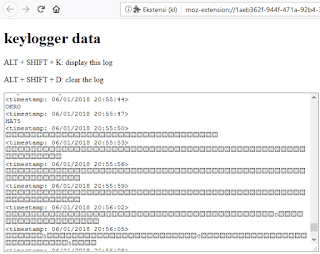
In conclusion, if you type a password or PIN on a computer, never use a manual keyboard, use the Virtual Keyboard. Who knows, on your computer you have a keylogger, especially if you often download applications or files from the internet.
Thus the tutorial how to easily steal passwords and accounts of others, hopefully this tutorial is useful and you are more wise in acting.
Thanks.
Tag :
Tips and Trik,
Ares - Python Botnet and Backdoor


Ares is made of two main programs:
Command and control server, which is a Web interface for managing agents and agent programs, that runs on compromised hosts and ensures communication with CNC
Web interfaces can be run on servers running Python. You need to install the cherrypy package. The client is a Python program intended to be compiled as a win32 executable using PyInstaller. it depends on the request, pythoncom, pyhook python modules and PIL (Python Imaging Library).
currently supporting :
- Remote cmd.exe shell
- Persistence
- File upload / Download
- Screenshot
- Key Logging
Installation Server :
To install a server, first create a sqlite databe
cd server/
python db_init.py
if it's not installed, install the cherrypy python package.
then discharge the server with the command:
python server.py
By default, the server listens on http: // localhost: 8080
agent
the agent can be launched as a python script, but it is ultimately intended to be compiled as a win32 executable using PyInstaller.
First, install all dependencies:
requests
pythoncom
pyhook
PILL
then configure agen /setting.py according to your needs:
ERVER_URL = URL of the CNC http server
BOT_ID = name (unique) of bot, leave blank to use hostname
DEBUG = must debug message to be printed to stdout?
IDLE_TIME = time of inactivity before going in standby mode (Agents check CNC for commands much more frequently when standby).
REQUEST INTERVAL = interval between each query to CNC when active
Finaly, use PyInstaller to compile the agent into a single exe file:
cd client /
PyInstaller --onefile -
noconsole agent.py
Tag :
Hacking,
Tear Drop Attack

This tear drop attack uses features in TCP / IP, which are packet fragmentation or packet splitting, and weaknesses that exist in TCP / IP when fragmented packets are put back together. This type of attack. Developed by exploiting the process of disassembly-reassembly data packages. In Internet networks, data management must be cut into small pieces to ensure the reliability & process of multiple network accesses. These pieces of data packets sometimes have to be cut back even smaller when channeled through a Wide Area Network (WAN) channel so that when passing through an unreliable WAN channel the process of sending data becomes more reliable.

However, modern network devices can detect this difference in fragmented packets. After they detect a problem, the package will be released or not sent.
Impact or Impact of the Attack :
When an unprotected server receives packets frequently, this overlapping causes a system crash, hang & reboot at the other end.
Prevention:
The server can be protected from this type of teardrop attack by packet filtering through a firewall that has been configured to monitor and block dangerous packages like this.
Tag :
Information,
Important codes for tracking damage to an Android smartphone

But as a form of technological progress, smartphones apparently keep a lot of secrets in them.
One of them is the dial codes that can bring smartphone owners into certain menus.
These codes are apparently very numerous and have various functions, one of which can be used to test the condition of the smartphone.
The following is a smartphone code that you can use to test and find out the condition of your smartphone's machine.
* # * # 0 * # * # * This code has the main function to check the android screen. After pressing this code several options will appear red, green, blue, receiver (white), vibration (black), dimming, megacam, sensor, touch, sleepmode, speaker, and sub key.
* # 2664 # This code is also for checking screens. After pressing the screen code will turn black, touch the screen and move around, a red line will appear. If you draw a line and something is broken, then there is a problem with the cellphone screen.
* # 2663 # On this menu there is a firmware version touch screen info, and an option to update online.
* # 0673 # This code is for checking speakers. After pressing this code the selection keys Speaker_on, Receiver_on, Headset_on Left, Headset_on Right, Receiver_Headset_on Left, Receiver_Headset_on Right, OFF, and EXIT will appear.
* # 0842 # This code is for checking the vibration capability of a cellphone. In this menu there will be several On, Off, Auto buttons to try the phone vibrate mode.
* # * # 4636 # * # * This code contains the handset's information menu, battery information, displays cell phone usage statistics and applications. Also can be known information about WiFi.
* # 232337 # After entering this code a Bluetooth device address will appear.
* # 44336 # Displays cellphone firmware version information, when the phone was made, and changelist.
* # * # 4636 # * # * This code can be used to get interesting information about phones and batteries, including: Handset Information, Battery Information, Battery History and Usage Statistics
How to test WLAN, GPS and Bluetooth
* # * # 232338 # * # * Displays the WiFi MAC address
* # * # 1472365 # * # * Test GPS
* # * # 1575 # * # * Testing other GPS
* # * # 232339 # * # * or * # * # 526 # * # * OR * # * # 528 # * # * Testing WLAN (Use the "Menu" button to start various tests)
* # * # 232331 # * # * Testing Bluetooth
* # * # 232337 # * # Displays Bluetooth devices
How to find out the Firmware version information
* # * # 1234 # * # * Knowing PDA and Handset
* # * # 1111 # * # * Knowing the FTA SW version
* # * # 44336 # * # * Knowing PDA, Phone, CSC, Build Time, Changelist number
* # * # 4986 * 2650468 # * # * Knowing PDA, Phone, H / W, RFCallDate
* # * # 2222 # * # * Knowing the FTA HW version
Code for displaying various tests
* # * # 0673 # * # * or * # * # 0289 # * # * Test Melody or Tone
* # * # 0842 # * # * Testing Device (Vibration and BackLight)
* # * # 2663 # * # * Knowing the Touch screen version
* # * # 0283 # * # * Packback Loopback
* # * # 0 * # * # * Testing the LCD
* # * # 2664 # * # * Testing Touch screen
* # * # 0588 # * # * Test the proximity sensor
* # * # 3264 # * # * Know the RAM version
Tag :
Information,
Tips and Trik,