


Showing posts with label Hacking. Show all posts
Ares - Python Botnet and Backdoor


Ares is made of two main programs:
Command and control server, which is a Web interface for managing agents and agent programs, that runs on compromised hosts and ensures communication with CNC
Web interfaces can be run on servers running Python. You need to install the cherrypy package. The client is a Python program intended to be compiled as a win32 executable using PyInstaller. it depends on the request, pythoncom, pyhook python modules and PIL (Python Imaging Library).
currently supporting :
- Remote cmd.exe shell
- Persistence
- File upload / Download
- Screenshot
- Key Logging
Installation Server :
To install a server, first create a sqlite databe
cd server/
python db_init.py
if it's not installed, install the cherrypy python package.
then discharge the server with the command:
python server.py
By default, the server listens on http: // localhost: 8080
agent
the agent can be launched as a python script, but it is ultimately intended to be compiled as a win32 executable using PyInstaller.
First, install all dependencies:
requests
pythoncom
pyhook
PILL
then configure agen /setting.py according to your needs:
ERVER_URL = URL of the CNC http server
BOT_ID = name (unique) of bot, leave blank to use hostname
DEBUG = must debug message to be printed to stdout?
IDLE_TIME = time of inactivity before going in standby mode (Agents check CNC for commands much more frequently when standby).
REQUEST INTERVAL = interval between each query to CNC when active
Finaly, use PyInstaller to compile the agent into a single exe file:
cd client /
PyInstaller --onefile -
noconsole agent.py
Tag :
Hacking,
how to turn off other people's computers via CMD
Hi, how are you ? ^ _ ^ This time nisa love Tutorial Turning Off Other People's Computers Through Chess ^ _ ^ Okay, let's just say right now: * 1. First enter Run, how do you click Windows + R on your Kmu keyboard 2. Next type cmd and select Ok or press Enter, 3. When the cmd black screen appears, then type the net veiw -a command or you can also type net view, if added -a command all SSIDs to be more complete with details 4. You will see a list of computer or laptop users who are both using wifi access with you on the CMD display 5. Next select one of the computer_name you want to turn off and then write the command ping computer_name without the double slash reverse \\ 6. For example the name of the computer is \\ Danto2017 then type ping Danto2017 and press enter, you can see the IP of the other person's computer. 7. Next to the CMD you type shutdown - will appear in the Remote Shutdown Dialog dialog box, select Add 8. Enter the victim's IP address, see step 6, select the Restart or Shutdown option you want, change the Display Warning For time span to 5 seconds 9. Add comments if you want for example "Your computer will we turn off, the server is in the process of repair. Thank you" 10. Then to turn off the other person's computer, press OK For the sake of how to turn off other people's computers through CMD that you can use to disconnect other people's wifi connections from your computer, don't forget to share this hacking article huh ^ _ ^ Hopefully Helpful: *
SYN flooding attack

In a SYN flood attack, the client will flood the server with many TCP SYN packets. Each TCP SYN packet sent causes the server to respond with a TCP SYN ACK packet. The server (recipient) will continue to log (create a backlog queue) to wait for TCP ACK responses from clients sending TCP SYN packets. The backlog queue is certainly limited & is usually small in memory. When the backlog queue is full, the system will not respond to other TCP SYN packets that enter in its simple language the system looks blank / hangs. Unfortunately, the TCP SYN ACK packet that enters the backlog queue will only be removed from the backlog when there is a time out of the TCP timer indicating there are no responses from the sending client. Usually this TCP internal timer is set quite long.
The key to SYN attacks is to flood the server with TCP SYN packets using chaotic source IP addresses. As a result, because the source IP address does not exist, obviously no TCP ACK will be sent as responds from TCP SYN ACK packet responses. In this way, the server will look like a blank and does not process responses in a long time. Various computer vendors have now added defense to this SYN attack & firewall programmers also guarantee that their firewalls do not send packets with chaotic source IP addresses.

And in this SYN attack the attacker will send a large amount of SYN data and will be sent to the ports on the existing host with an invalid SYN data address or contents, so the host or computer that receives the data packet becomes confused and sending a SYN ACK data packet that has no purpose here results in losing a lot of SYN data in the router and causing the router to crash because it waits for a reply from the computer inside the SYN address the first time.

1. Open the terminal or CTRL + ALT + T
2. Then type the command sudo apt-get install hping3
3. Wait for the process to finish.
4. To find out the features of hping3, you can see the documentation by typing man hping3 or hping3 -help in the terminal.
To do a syn flood, we use hping3 that was installed before. Here's how to do syn flood.
1. Open the terminal.
2. Type the command hping3 -I wlan0 -c 1000000 --faster -S 10.10.10.1
information :
-I = shows the interface used to join the network
-c = cont packet to be sent, in a big sense the packet to be sent is 1000000 bytes
- faster = the speed of the 1000 data that will be sent in the network
-S = source or destination that will be sent this flooding packet
Prevention:
blocking null packages
iptables -A INPUT -p tcp --tcp-flags ALL NONE -j DROP
-A = add rulles ..
-p = protocol
farewall takes all incoming packets that are marked with the ALL NONE flag and then Drop it. This pattern of attack uses this to try and see how we configure VPN and find out weaknesses
and next to reject the SYN attack
iptables -A INPUT -p tcp ! --syn -m state --state NEW -j DROP
SYN-Flood-Attacks means the attack opens a new connection but with empty packages (ie. SYN, ACK,).
iptables -A INPUT -p tcp --tcp-flags ALL ALL -j DROP
Ping of Death
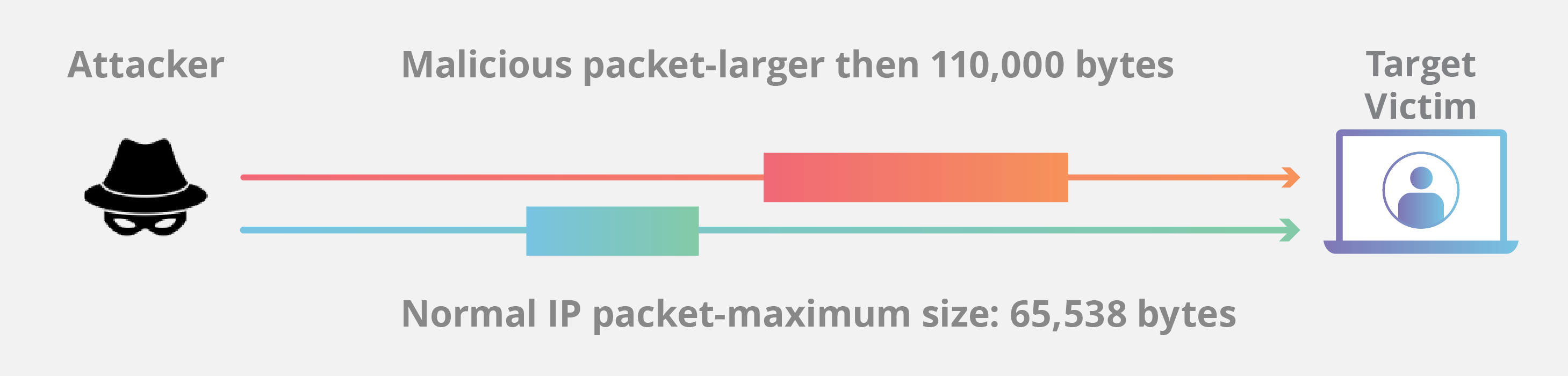
There are 3 pc connected to the router. But 2 of the 3 pc attack 1 pc that is marked in red.
Explanation:
Ping of death is a form of DDOS attack using the method of requesting a reply from the server to be attacked. This attack is done by making a request for a reply from the server continuously so that the server will be fulfilled by a reply request from 1 pc and cause the server is unable to service requests from other PCs.
Ping 192.168.88.254 -t -l 65500

How to carry out an attack:
Use the Command Prompt and type ping [ip address] -t -l 65500
example: ping 192.168.88.254 -t -l 65500.
Information:
-t is a command to recursively request to the server
-l is a command to request a size request from the server
65500 is the maximum size that can be sent
Effects of an attack:
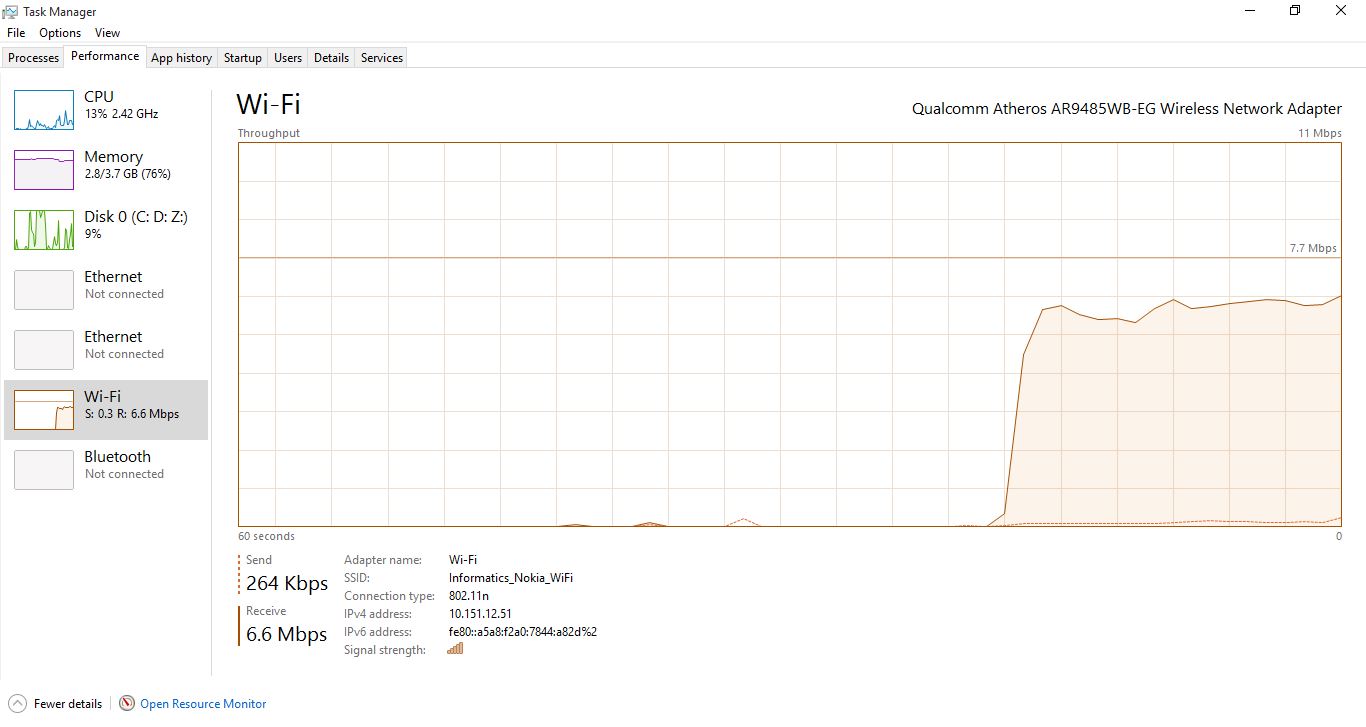
It can be seen significantly that after pinging of death the flow of the internet immediately experienced a significant increase in traffic.
Prevention :
Doing the installation of IDS (instrution detection system), in this case the IDS used is Snort. Intrusion Detection System is a tool used to prevent network attacks from outside.

Then check the ip that has been set on the computer.

The next step is to configure it on /etc/snort/snort.conf

Next, edit the snort rule to deal with ping of death attacks.

Then run a snort So when done ping of death will be detected by Snort,


Then when done ping of death will be detected by Snort.

How to spy on WhatsApp messages with Mac Spoofing techniques?
How to spy on WhatsApp messages with Mac Spoofing techniques?
Mac Spoofing uses Media Access Control to spy on WhatsApp. This is a security code consisting of letters and numbers. Every mobile has its own that is different from others. This is also called a physical address or an Ethernet or LAN address.
How to use Mac Spoofing techniques?
Let's see, now, what are the basic steps to see other people's WhatsApp messages with this method? Here is what you need:
Our phone where we have installed WhatsApp.
Your cell phone wants to spy on people (it takes only two minutes).
At this point, the first step is to take the Mac address of the person you want to spy on, and write it down. The code we need to have a structure like this: 06: B3: 92: F4: 34: AC.
Settings> general> about> Wi-Fi address.
To find a Mac address on Android: go to settings> about phone> Status> Wi-Fi MAC address.
If the phone is connected to the same Wi-Fi line, you can find the Mac address directly from a PC or Mac:
> On Windows: Click on the connection-related computer icon (below right next to date). Click "Open network and sharing center". Go to "Swap customizer". Then, click with the right button on the network card icon that interests you. Go to "Status". Click "details". The Mac address matches the code next to "Physical address".
> On OS X / Mac (Apple operating system, not to be confused with Mac addresses): go to System Preferences> network> Advanced> Hardware. Mac Address is the first information that you find in the window.
Now you must follow the steps below:
Uninstall WhatsApp from your mobile.
Change your Mac address with one of the people you want to spy on (the app does a lot of this, and we recommend WifiSpoof for iPhone and busy boxes for Android).
Reinstall WhatsApp on your phone, being careful to enter people's phone numbers to spy on if needed.
Request an activation code via SMS (warning! The code will be sent to your cellphone. You want to spy on people. The phone must be with us. Write down the code and then delete the message to avoid being trapped in the law).
Reset the original Mac address on your phone.
If all steps are done correctly, WhatsApp will automatically display all messages, photos and videos from the person you are spying on.
How to defend yourself?
Spying on messages on WhatsApp is invalid, and this site divulges all information for informational purposes only, denying responsibility for any illegal use. However, it is always good to think of fending off anyone who intends to be sick. To do this, it's best not to give your phone to someone else and not connect a smartphone Wi-Fi network you suspect.
Spy on messages from your PC with WhatsApp Web
In 2015, WhatsApp launched the WhatsApp Web service to use applications directly on a PC or Mac. This, however, has also introduced huge risks to user safety. Spying on messages, in fact, this is very simple. Just take ownership on someone's cellphone you want to spy on, and access the WhatsApp web service website by entering QrCode. After logging in, stay connected until you log in. So, just return the phone and leave the PC turned on (maybe with a minimized Google Chrome window to avoid getting caught). After that time, every conversation will be displayed on your PC.
This technique is illegal, and is shown here for informational purposes only. To protect yourself, it's best not to give your phone to other people.
NB realize that because of the latest WhatsApp update, a banner might appear on the victim's phone screen informing them that another device from the WhatsApp web is logged into their account.
Secretly spying on someone's cellphone with Mspy
Mspy is an advanced tool that will allow you to spy on messages sent and received on any application that can include WhatsApp instant messages.
Mspy is actually a very simple and more effective solution for spying on someone using WhatsApp.
Mspy is one of the leading companies that now sells spy software and Androids, iPhone and Windows phone applications. This software will let you monitor all activities on victims of a smartphone or tablet without them knowing which is a feasible idea for someone to play detective and spy on someone else.
You will be able to see everything that has been sent and received from that person's cellphone such as their phone calls, text messages, voice messages, browsing history, and multimedia content that has been sent or received and many other things. This application also offers the opportunity to get real-time map positions by using the built-in cell phone GPS system meaningless victims
how to hack running text on Android

Hi fans meet again with Nisa 😂 This time Nisa wants to give a simple tutor to hack the running text 😂😂 so it looks like a hacker pro ea ....: 'v
Okay, just go ahead
• Download the Apk first - >>> https://drive.google.com/file/d/1csLGReZ5YZpNo71Vx_DRy5-rwsBS20tF/view?usp=drivesdk
• Search for wifi with the name TF-WIFI_ xxxxxx
• If the Wifi uses a password, give it the password (88888888)
• Press Edit Program, then, Press Add, then continue editing
• Then Back and send
• confirm --- --- >> Done
That is all from Nisa 😅 Hope it is useful ^ _ ^